Design Thinking 101: A Practical Course with Exercises
Learn design thinking as a simple five-step method for any problem, from one screen to a whole organization. Exercises and readings included.

You. The designer, or the person facilitating.

Other people. Users, colleagues, stakeholders.

Interface. Anything people act on or through: a sticky note, a document, a screen, a prototype. Drawn flat or tilted.
-
Environment. Where the action happens.
-
Transition. The move from one state to the next.
The diagrams in these courses use The Shape of Clarity, a small visual notation. Five shapes are enough.
Small labels or icons say what an interface holds: a question (?), an insight (!), ideas (a light bulb), a decision (a check mark). Speech bubbles and the chart symbol, for evidence, are added on top of the notation when needed; they are not part of it.
Read the notationContents
- About this course
- 1. Why draw it: visual models before theory
- 2. Design thinking is an algorithm
- 3. The algorithm is recursive: one model, every scale
- 4. Inside each step: the blackboard
- 5. Understand: question → insight
- 6. Ideate: insight → ideas
- 7. Decide and prototype: ideas → decision → prototype
- 8. Test: prototype → evidence
About this course
Design thinking is often taught as a series of workshops and sticky notes. This course teaches it as an algorithm: five steps, each one turning an artifact into another. You learn the model in a few minutes through simple diagrams, then you practise it on a real case.
- Who it is for: anyone who solves problems with other people and wants a clear method: communications, marketing, product, operations, and new designers.
- How it works: self-paced. Each section has a short explanation, a diagram, an exercise (Do), and readings for those who want to go further (Read). Readings favour data-oriented sources.
- Your case: pick one digital product to work on through the whole course. It is either a build case (the product doesn’t exist yet) or an evolve case (it exists and must change). If you continue with UX Research 101 and UX Design 101, keep the same case.
- Where this fits: this is the only loop in the series. UX Research 101 details the two steps where it touches reality (Understand and Test). UX Design 101 applies it to the design of digital products.
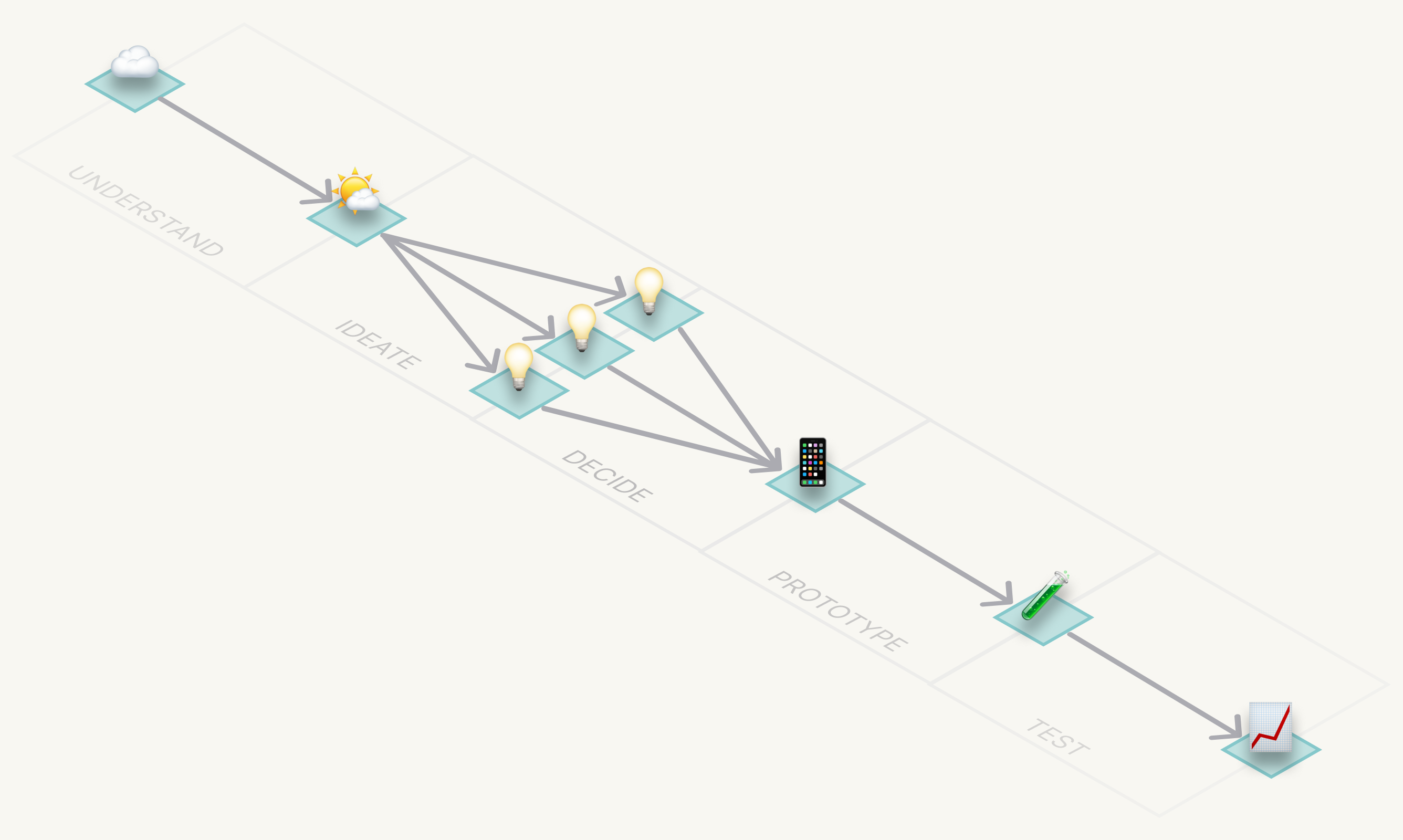
1. Why draw it: visual models before theory
A good diagram lets you reason by looking instead of remembering. The relationships are on the page, so your memory doesn’t have to hold them. This course gives you one diagram, then puts you to work inside it.
Evidence (📈) sits apart from the row. It is anything you can measure in reality, not something you hold.
Do. Draw your last project from memory as a row of boxes. At each moment, what did you have in hand: a question, an insight, a list of ideas, a decision, a prototype, some evidence?
Read.
- Larkin & Simon (1987), Why a Diagram is (Sometimes) Worth Ten Thousand Words, Cognitive Science
- Tversky (2019), Mind in Motion
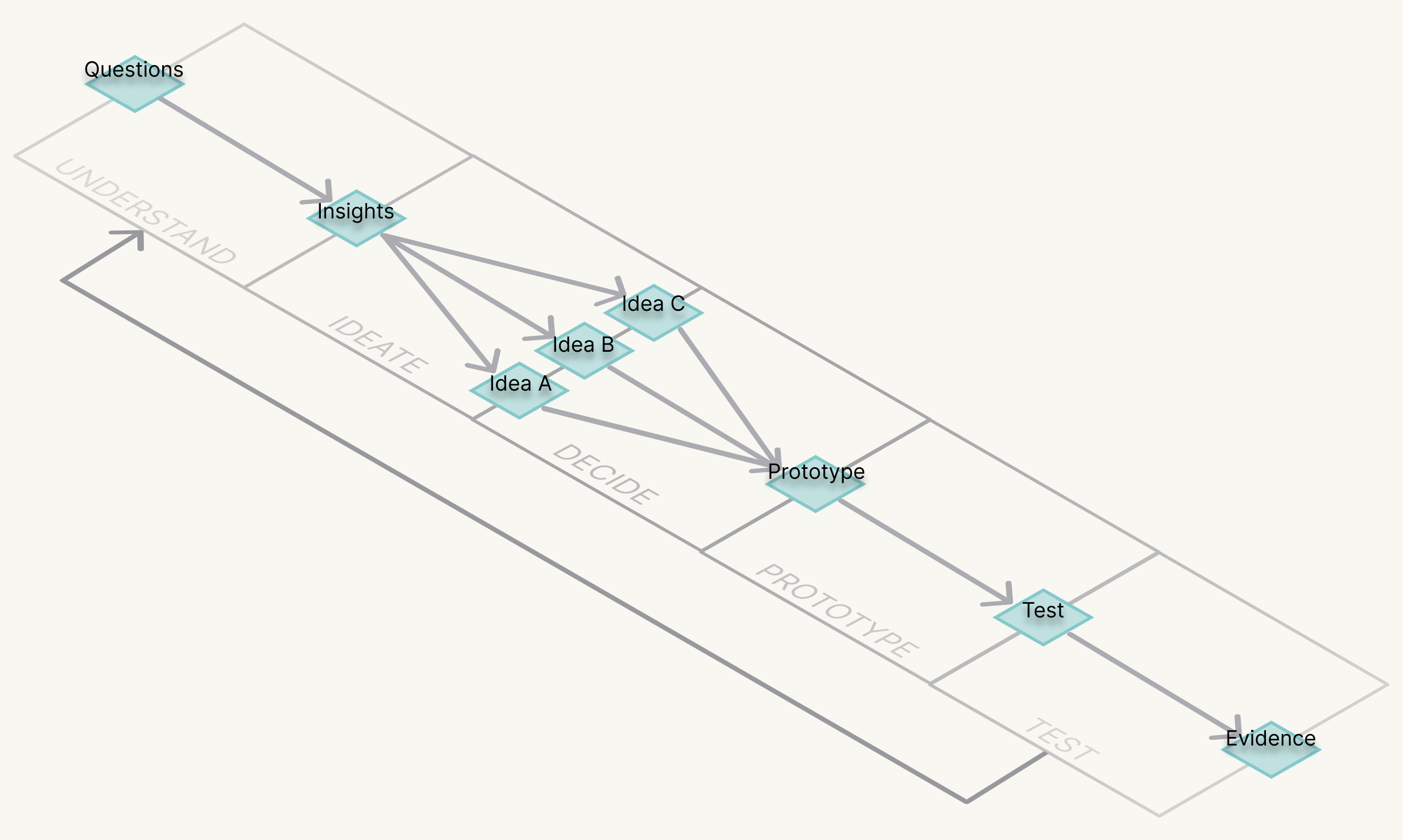
2. Design thinking is an algorithm
The input is a question. The output is evidence about a solution. In between, there are five transformations:
- Understand: question → insight
- Ideate: insight → ideas
- Decide: ideas → decision
- Prototype: decision → prototype
- Test: prototype → evidence
Converging means making a decision. A prototype is a decision made tangible. The order is flexible: you can enter anywhere and jump anywhere. Skipping a step is not allowed. Testing is understanding again: it closes the loop and opens the next question.
Picture each step as an environment. You enter holding one interface (in a quick exercise, a sticky note with a question) and you leave holding another (a sticky note with an insight). The output of one environment is the input of the next. The work travels through them like a vehicle, one transition at a time.
Because the algorithm names artifacts and not a medium, it works in any design discipline: a service, an object, a space, a policy, a digital product.
Do. Label each box with an artifact from a real project. Which box is empty?
Read.
- NN/g, Design Thinking 101 (Gibbons, 2016)
- Atman et al. (2007), Engineering Design Processes: A Comparison of Students and Expert Practitioners, Journal of Engineering Education: data on how experts spend their time across steps
- Simon (1969), The Sciences of the Artificial
- Brown (2008), Design Thinking, Harvard Business Review
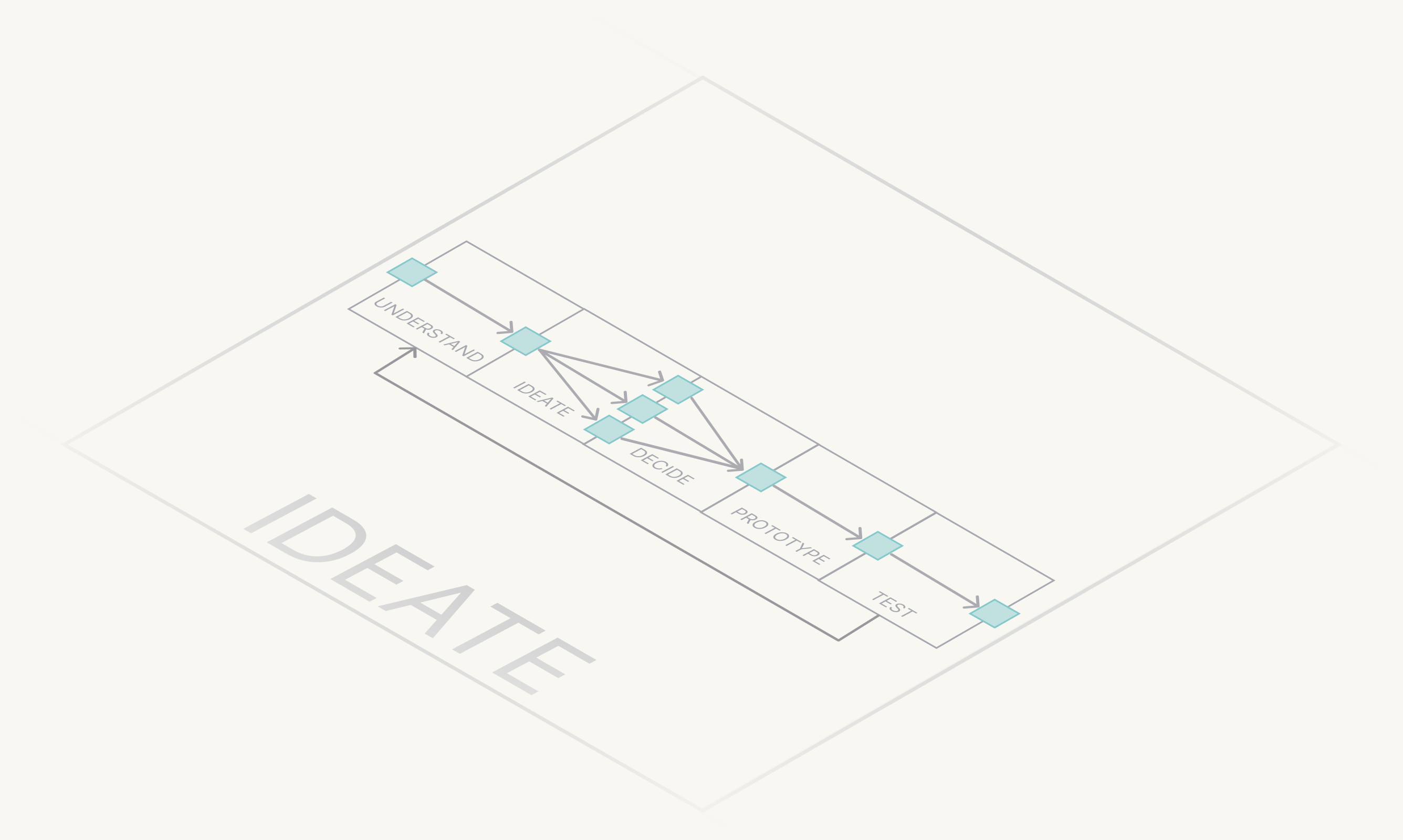
3. The algorithm is recursive: one model, every scale
Any step can be solved by running the five steps inside it. Deciding which idea to prototype has its own question, insight, ideas, decision, prototype and evidence. So does designing one screen, one product, or the way a whole organization designs. The model stays the same; only the scale changes.
That is where its power lies. You learn one clear, simple model and apply it with flexibility: to structure the screen you need to design today, and to structure the end-to-end design process of an organization.
Do. Take one step of your case (for example, Prototype) and write the five steps inside it. What are its question, insight, ideas, decision, prototype and evidence?
Read.
- Simon (1962), The Architecture of Complexity, Proceedings of the American Philosophical Society: why complex systems are built from nested, similar parts
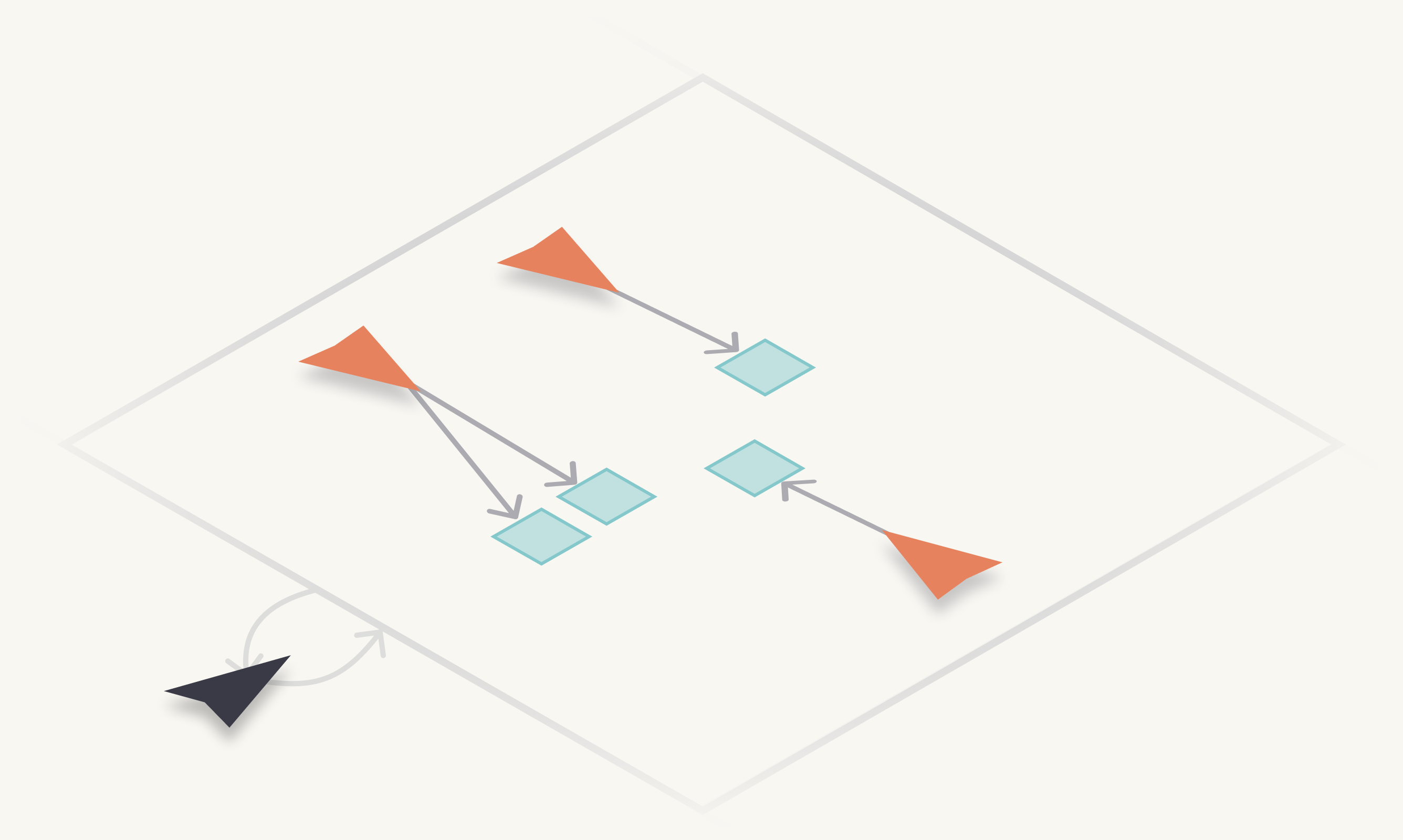
4. Inside each step: the blackboard
Every step is a controlled environment. In the middle sits a shared surface: a wall, a board, a Figma file. Around it, people with different expertise contribute to that surface when they have something to add. One person facilitates: they decide who contributes when, keep the surface readable, and close the step when its output is ready.
The model comes from classical AI blackboard systems. In those systems, independent knowledge sources write to a shared blackboard, and a control component decides which one acts next. It is practical: “one board, many experts, one facilitator” is easy to explain, and it works in a workshop right away.
Facilitation is a core skill in every design role. In design leadership it becomes central, because much of the work is getting a group to a good decision.
Do. Run the co-creation round of section 6 as a blackboard: one board, three contributors, one facilitator. Rotate the facilitator role. Each facilitator names one moment when the group was hard to steer, and what they did about it.
Read.
- Nii (1986), The Blackboard Model of Problem Solving and the Evolution of Blackboard Architectures, AI Magazine
- NN/g, Workshop Facilitation 101
- Kaner et al. (2014), Facilitator’s Guide to Participatory Decision-Making, 3rd edition
- Merholz & Skinner (2016), Org Design for Design Orgs: facilitation and influence in design leadership
Go deeper. Organizational Design 101 (in preparation).
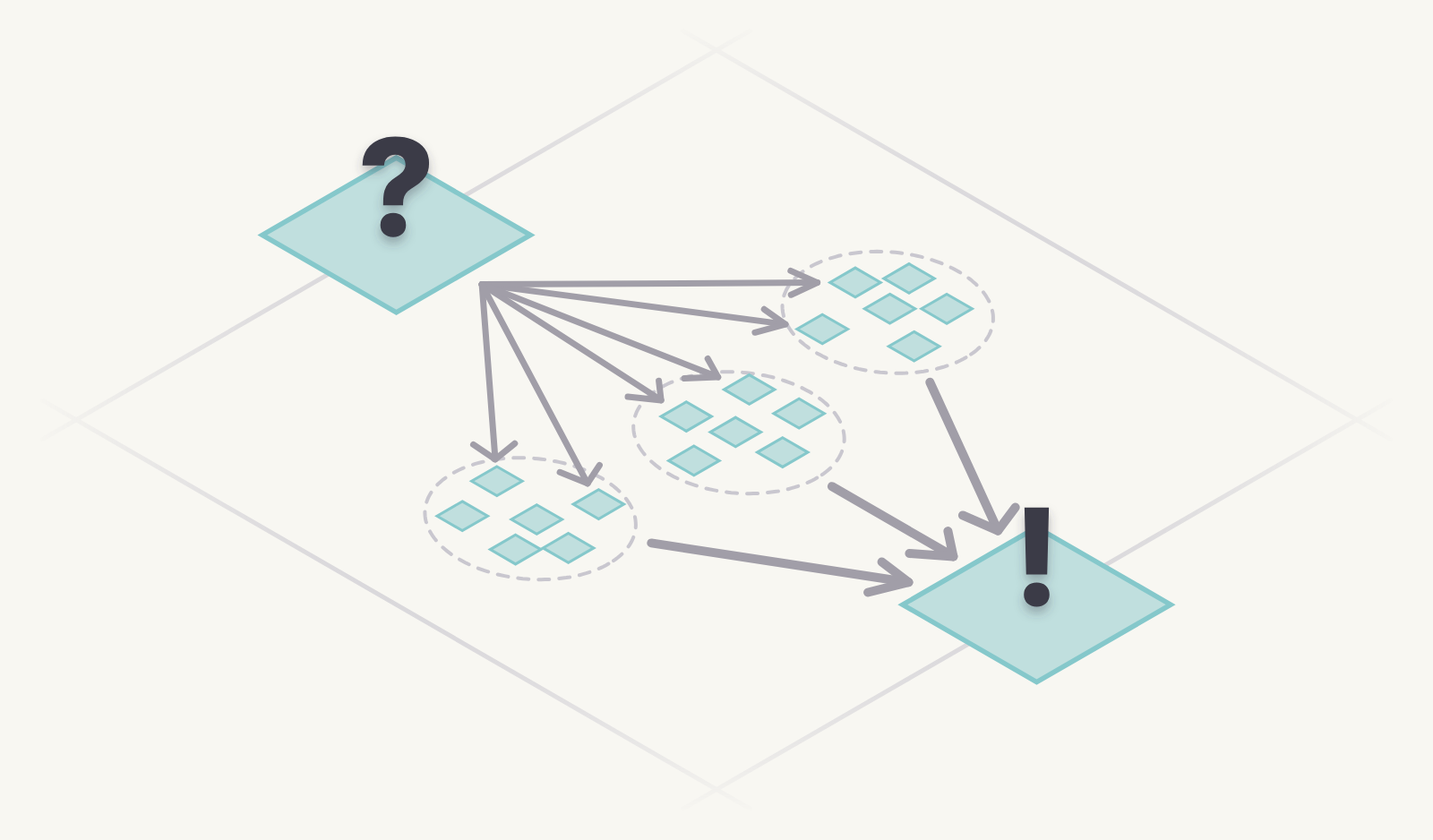
5. Understand: question → insight
Turn a vague question into an insight. The chain has four links:
- Observations: what you saw or heard.
- Findings: patterns across observations.
- Insight: a finding plus its implication.
- “How might we…?”: a question that opens the next step, Ideate.
Observations that can be measured or verified carry evidence.
Do. Run three short interviews, in pairs if you can. Make an affinity map of your observations, name two or three findings, write one insight, then turn it into one “How might we…?” question.
Read.
- NN/g, When to Use Which User-Experience Research Methods
- NN/g, Affinity Diagramming for Sorting UX Findings and Ideas
- NN/g, Using “How Might We” Questions to Ideate on the Right Problems
- Portigal (2023), Interviewing Users, 2nd edition
Go deeper. UX Research 101: choosing a method, interviews, usability testing, and synthesis.
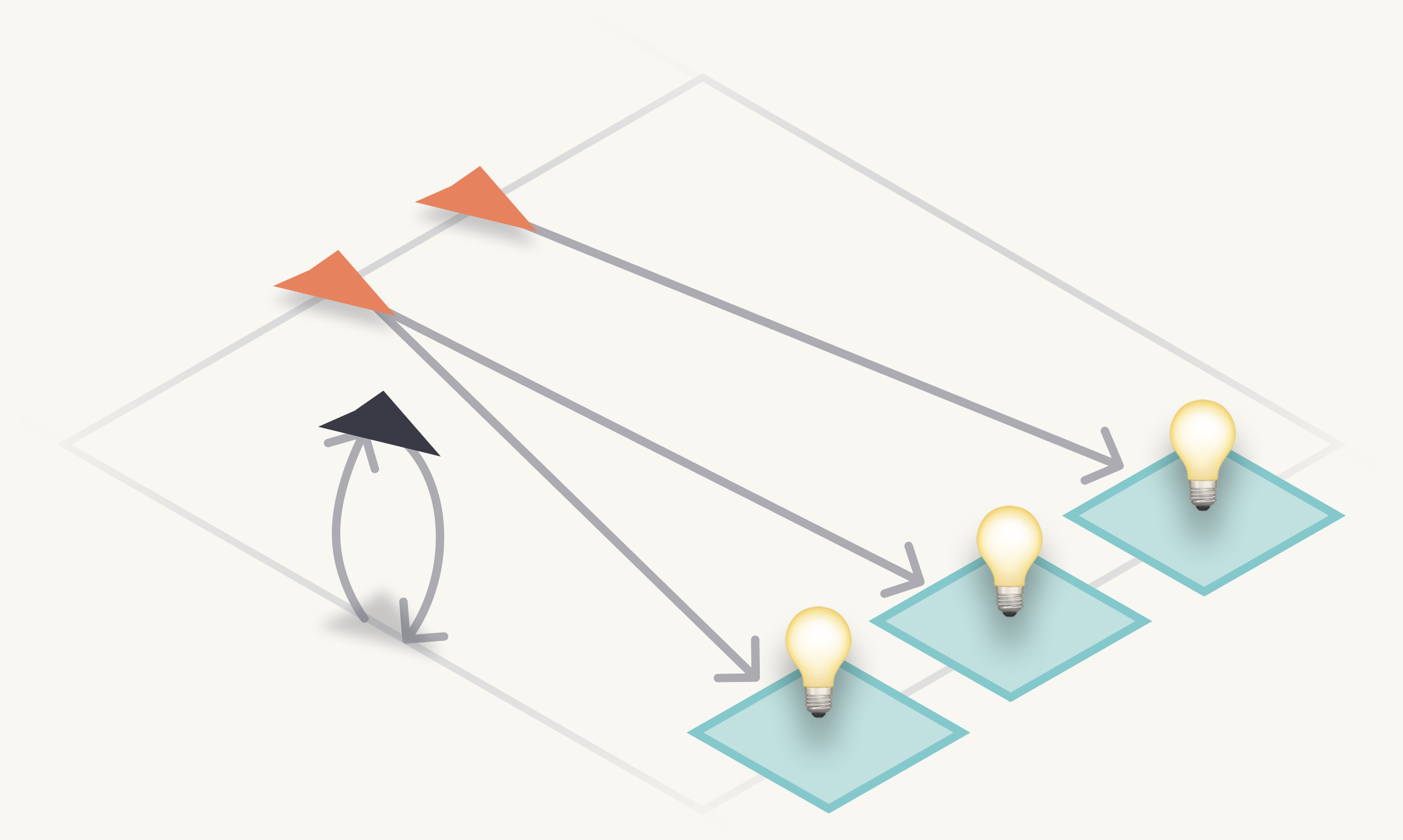
6. Ideate: insight → ideas
Diverge. One insight must produce several distinct options. Quantity first; judge later.
Ideate alone first, then with others. Co-creation brings the people you design for (and with) into the room, so they build on, combine and add ideas instead of only reacting to yours.
Do. Crazy 8s: eight ideas in eight minutes, alone. Then run a 15-minute co-creation round with two or three people playing users or stakeholders: they add, combine or sketch their own ideas. Optional: turn your two strongest ideas into quick visuals with a free AI tool (see UX Design 101, “Fidelity and tools”).
Read.
- Google, Design Sprint Kit: Crazy 8’s
- Sanders & Stappers (2008), Co-creation and the New Landscapes of Design, CoDesign
- NN/g, Ideation in Practice: How Effective UX Teams Generate Ideas: a survey of 257 practitioners
- Dow et al. (2010), Parallel Prototyping Leads to Better Design Results, More Divergence, and Increased Self-Efficacy, ACM TOCHI
- Diehl & Stroebe (1987), Productivity Loss in Brainstorming Groups, Journal of Personality and Social Psychology: why “alone first”
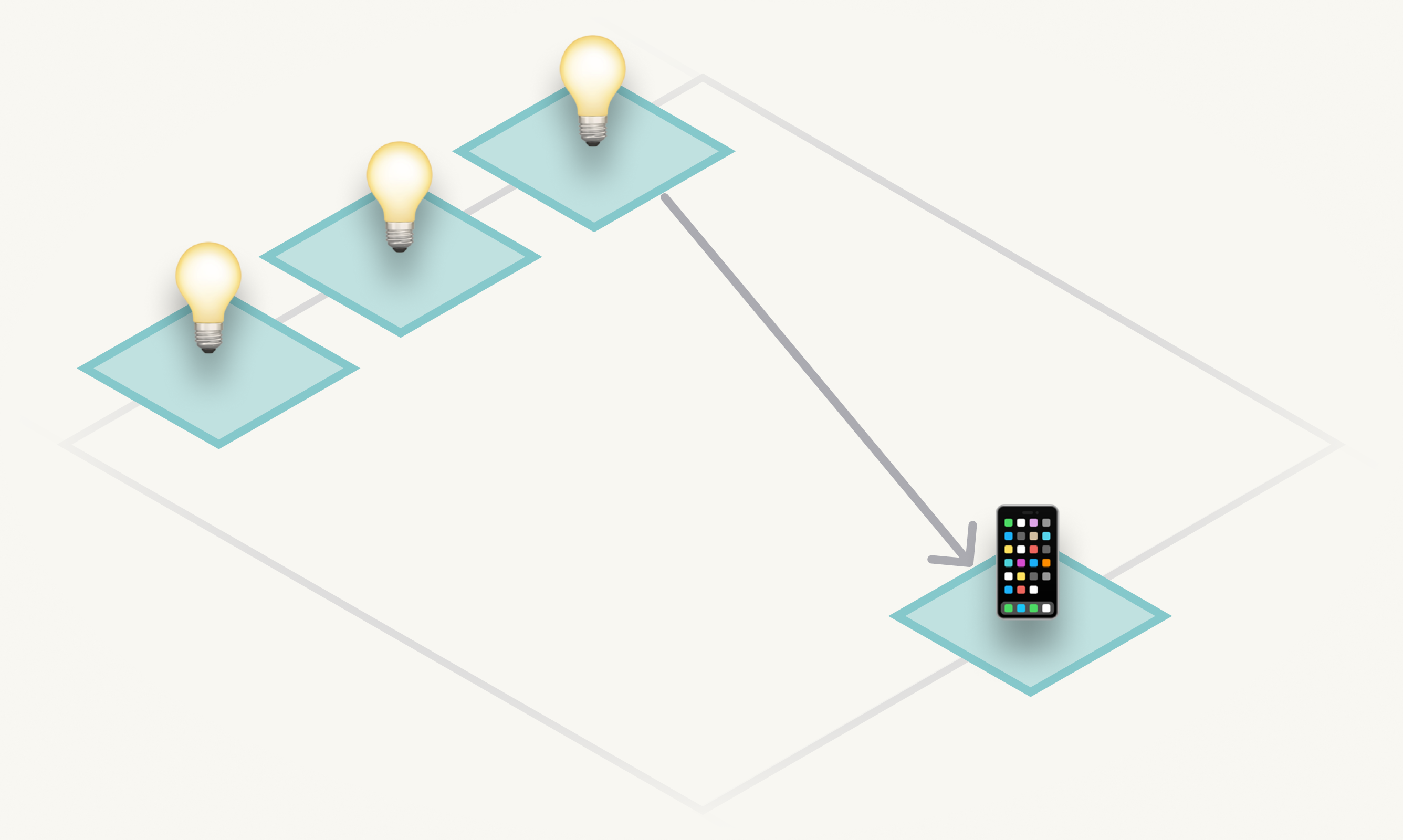
7. Decide and prototype: ideas → decision → prototype
Converge. Converging is deciding: compare the options against explicit criteria, pick one, and assemble the argument that justifies it. A sound argument has three parts: a claim (what you chose), the evidence behind it, and the warrant (why that evidence supports that claim).
A prototype is that decision made tangible — just enough to ask the specific question it exists to answer. Fidelity is a choice, not a goal.
Do. Score your ideas in a prioritization matrix, write a five-line argument for the winner, then make a paper prototype of that decision in 20 minutes.
Read.
- NN/g, Using Prioritization Matrices to Inform UX Decisions
- Lovallo & Sibony (2010), The Case for Behavioral Strategy, McKinsey Quarterly: across 1,048 decisions, the decision process mattered more than the analysis
- Knapp et al. (2016), Sprint: the “Decide” day
- Toulmin (1958), The Uses of Argument
- NN/g, UX Prototypes: Low Fidelity vs. High Fidelity
- Houde & Hill (1997), What Do Prototypes Prototype?
Go deeper. UX Design 101: fidelity and tools.
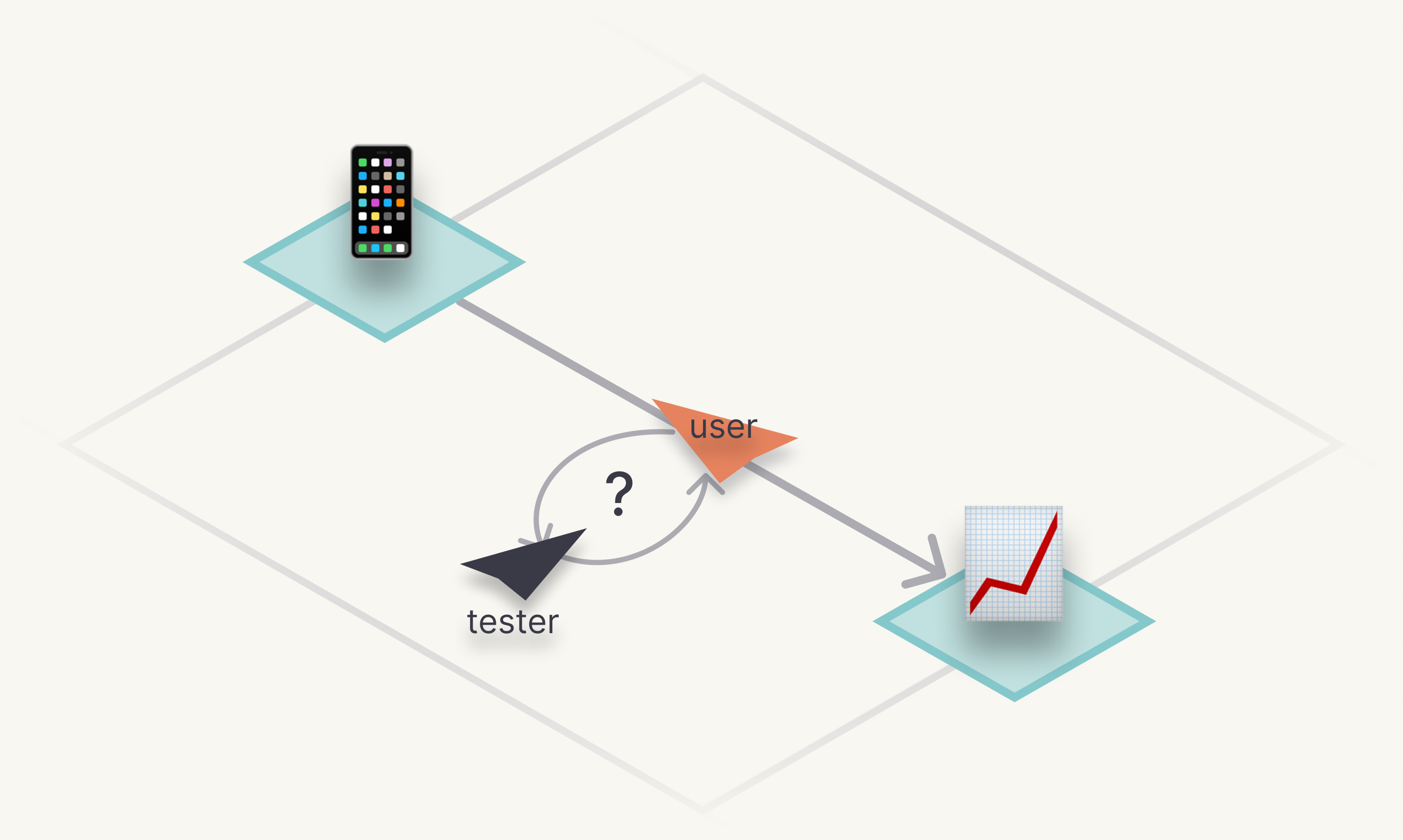
8. Test: prototype → evidence
Put the prototype in front of real people and observe. What you can measure is evidence, and evidence becomes the next question. Testing is understanding again, this time with something in people’s hands.
Do. Test someone else’s prototype (or your own) with five people and report three findings. If you can only find one person, test with one: one is better than none.
Read.
- NN/g, Usability Testing 101 (Moran, 2019)
- NN/g, Why You Only Need to Test with 5 Users (Nielsen, 2000)
- Nielsen & Landauer (1993), A Mathematical Model of the Finding of Usability Problems, INTERCHI
- Krug (2010), Rocket Surgery Made Easy
Go deeper. UX Research 101: usability testing, including how many people to test with.
Bring clarity and structure to your team
The same method, applied to your organization: a fixed-scope diagnostic with one price, one timeline and a deliverable described up front.